
Output Light
Overview
- Purpose: The Output Light is a digital component that provides visual indication of a binary signal state. It converts a digital signal into a visual representation, showing when a signal is HIGH or LOW.
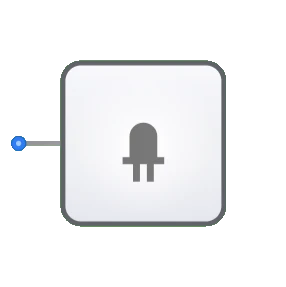
- Symbol: The Output Light is represented by a circle or light bulb symbol with an input pin.
- DigiSim.io Role: Serves as a visual indicator in digital circuits, enabling users to observe the state of signals at specific points in the circuit during simulation.
Functional Description
Logic Behavior
The Output Light displays the state of the input signal by changing its visual appearance.
Visual States:
| Input Value | Visual State |
|---|---|
| 0 (LOW) | Off/Dark |
| 1 (HIGH) | On/Illuminated |
Inputs and Outputs
- Input: A single 1-bit input that determines the state of the light.
- Outputs: None. The Output Light is a terminal component that provides visual feedback only.
Configurable Parameters
- Color/Appearance: The visual style of the light when illuminated may be configurable in DigiSim.io.
- Label: Optional text label that can be assigned to identify the light's purpose in the circuit.
Visual Representation in DigiSim.io
The Output Light is displayed as a circular or bulb-shaped symbol that changes appearance based on its input state. When receiving a HIGH signal, the light appears bright or colored to indicate illumination. When receiving a LOW signal, it appears dim or uncolored to indicate an off state. This visual change makes signal states immediately apparent during circuit simulation.
Educational Value
Key Concepts
- Signal Observation: Demonstrates how signal states can be visually monitored in digital systems.
- Circuit Debugging: Illustrates the concept of observing internal signals for troubleshooting purposes.
- Output Interfacing: Introduces how digital signals can control real-world indicators.
- State Feedback: Shows how digital systems can provide visual feedback about internal states.
Learning Objectives
- Understand how to monitor signal states in digital circuits.
- Learn to use output indicators for circuit debugging and verification.
- Recognize the importance of visual feedback in digital systems.
- Apply output lights strategically to observe critical signals in complex circuits.
- Develop skills in interpreting signal behavior through visual indicators.
Usage Examples/Scenarios
- Signal Monitoring: Observing the state of key signals during circuit operation.
- Logic Verification: Confirming the correct output of logic gates or combinational circuits.
- Debugging Aid: Identifying issues by monitoring signals at strategic points in a circuit.
- State Indication: Showing the current state of sequential circuits like flip-flops or counters.
- Output Display: Representing the final output of a digital system in a visually interpretable form.
Technical Notes
- The Output Light functions as a purely passive component that doesn't affect the signal it's monitoring.
- In DigiSim.io, the light responds immediately to input changes, whereas physical indicators might have slight delays.
- Multiple Output Lights can be placed throughout a circuit to simultaneously observe signals at different points.
- In physical implementations, output indicators typically require current-limiting components and appropriate drivers for proper operation.
Characteristics
- Visual indicator of digital signal state
- Single input, no outputs
- Acts as a signal sink or terminator
- Provides immediate feedback for circuit behavior
- Doesn't affect the signal it's monitoring
- May have configurable colors in simulation environments
- Represents any visual indicator (LED, lamp, etc.) in real hardware
Applications
- Status indicators in digital systems
- Monitoring signal levels during circuit operation
- Debugging digital circuits
- Indicating the completion of operations
- User feedback in interactive systems
- Error or warning indicators
- Power status indicators
- Activity or data transmission indicators
Implementation
In real-world applications, output lights are implemented using:
- Light Emitting Diodes (LEDs) with current-limiting resistors
- Small incandescent bulbs
- LCD or OLED display elements
- Seven-segment displays (for more complex numeric output)
- On-screen indicators in simulation software
Circuit Considerations
When using output lights in physical circuits:
- Current limiting is necessary (typically with resistors)
- Power consumption must be considered
- Voltage compatibility with the driving logic must be ensured
- Response time (if an actual indicator light) is usually negligible for digital applications
- Driver circuits may be necessary for high-current indicators
Related Components
- Digit Display: More complex output that shows numeric values
- LED Array: Multiple output lights arranged in a specific pattern
- Seven-Segment Display: Specialized arrangement of lights for showing numeric digits
- LCD/Screen: More advanced output device capable of showing complex information